

A cordless drill is one of the most versatile tools in any workshop. Whether you’re a weekend DIYer or a professional contractor, proper maintenance ensures your drill stays reliable, safe, and powerful for years. The good news? Most maintenance is quick and easy — and it saves you money on replacements.
We’ve tested top models like the DEWALT 20V Max Cordless Drill Driver Set (DCD771C2) and the CRAFTSMAN V20 Cordless Drill/Driver Kit (CMCD700C1) to bring you actionable tips. Below is a quick comparison of the best-selling drills on the market, followed by detailed maintenance steps.
Quick Comparison: Top Cordless Drills for Maintenance & Longevity
| Product | Price | Rating | Key Features | Buy at Amazon |
|---|---|---|---|---|
 DEWALT 20V Max Drill Driver Set DEWALT 20V Max Drill Driver Set |
$89.10 | 4.8 | 2-speed, high performance motor, 2 XR 1.3Ah batteries, contractor bag | Buy Now |
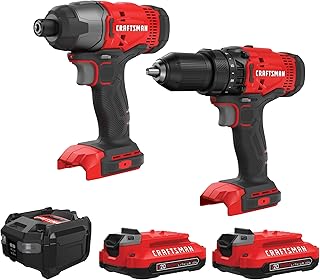 CRAFTSMAN V20 MAX Drill & Impact Driver Set CRAFTSMAN V20 MAX Drill & Impact Driver Set |
$99.00 | 4.8 | Brushless motor, 2 batteries, LED work light, bag | Buy Now |
 DEWALT 20V MAX Brushless Drill & Impact Driver DEWALT 20V MAX Brushless Drill & Impact Driver |
$152.10 | 4.8 | Brushless motor, 2 batteries, charger, bag | Buy Now |
 BLACK+DECKER 12V MAX Cordless Drill/Driver BLACK+DECKER 12V MAX Cordless Drill/Driver |
$34.99 | 4.6 | Compact, lightweight, battery & charger included | Buy Now |
 DEKOPRO 20V Cordless Drill Set DEKOPRO 20V Cordless Drill Set |
$24.79 | 4.5 | 20V battery, charger, 6 bits, variable speed | Buy Now |
Why Maintenance Matters for Your Cordless Drill
A well-maintained drill delivers consistent torque, longer battery life, and fewer breakdowns. Skipping simple steps like cleaning the chuck or storing batteries correctly can lead to expensive repairs or early replacement. Whether you own a budget-friendly DEKOPRO 20V Cordless Drill or a flagship DEWALT DCK277D2, the care principles are the same.
Daily & After-Use Care
Clean the exterior and vents. Wipe down the drill body with a dry cloth after each use. Dust and debris can clog cooling vents, leading to motor overheating. Pay special attention to the area around the trigger and chuck.
Remove and clean the chuck. For keyless chucks, open the jaws and blow out debris with compressed air. A dirty chuck can cause bits to slip and reduce accuracy.
Lubricate the chuck. Apply a drop of light machine oil to the chuck jaws every few months. This prevents rust and ensures smooth bit changes.
Battery Care & Storage
Batteries are the most expensive part of any cordless system. Proper storage can double their lifespan.
- Avoid extreme temperatures. Store batteries between 40°F and 80°F (5°C–27°C). Never leave them in a hot car or freezing garage.
- Keep batteries partially charged. For long-term storage (over a month), store at 40–60% charge. Fully charged or fully drained batteries degrade faster.
- Use the correct charger. Always use the charger that came with your drill or a compatible replacement. For tips on charging issues, see our guide on Fix a Cordless Drill Not Charging.
- Rotate batteries if you have two. If you own a kit like the CRAFTSMAN CMCK200C2 with two batteries, alternate usage to balance wear.
For a deeper dive, read How to Store Drill Batteries? and Extend Cordless Drill Battery Life.
Chuck & Gear Maintenance
The chuck is the heart of the drill. A loose or damaged chuck makes drilling inaccurate and dangerous.
- Check for wobble. Spin the drill without a bit. If you see wobble, the chuck may need tightening or replacement.
- Tighten the chuck by hand. After inserting a bit, tighten the chuck until it clicks. This prevents the bit from falling out under load.
- Inspect the gears. If you hear grinding or feel resistance when switching speeds, the gears may need grease. Most drills are sealed, so only disassemble if you’re experienced. Otherwise, send it to a service center.
For heavy‑duty users, brushless models like the DEWALT DCD777D1 (brushless motor, 2.0Ah battery) require less internal maintenance because there are no brushes to replace.
Safety Checks You Shouldn’t Skip
Before every use, perform these quick safety inspections. Refer to our Cordless Drill Safety Tips for a full checklist.
- Inspect the power cord and charger. Frayed wires or cracked plugs can cause shocks or fires.
- Test the trigger lock. Make sure the lock‑off button works properly. A malfunctioning lock can lead to accidental starts.
- Check the LED work light. If your drill (like the PULITUO 20V Cordless Drill/Driver) has an LED, ensure it still illuminates. A dead light often signals a circuit issue.
Troubleshooting Common Issues
Even with great care, problems arise. Here are fixes you can try before calling a pro.
- Drill won’t start: Check battery charge. If the battery is fully charged but the drill doesn’t run, the trigger switch may be faulty. See Fix a Cordless Drill Not Charging.
- Battery drains fast: Cold temperatures or repeated full discharges shorten runtime. Warm the battery in your hands before use and recharge before it hits 0%.
- Bit slips in chuck: Clean the chuck jaws with a small brush. If that fails, the chuck may need replacement. The DEKOPRO 20V is affordable enough that a new drill might be simpler than a chuck rebuild.
Choosing the Right Drill for Longevity
Not all drills are built to last. When buying a new tool, consider these factors.
- Brushless motors — more efficient, longer life, no brush replacement. The DEWALT DCK277D2 and CRAFTSMAN CMCK200C2 are excellent choices.
- Metal chuck — all‑metal chucks (like on the DCK 20V Brushless Hammer Drill, $75.99) resist wear better than plastic ones.
- Battery platform — stick with reputable brands (DEWALT, CRAFTSMAN, BLACK+DECKER) so you can buy replacement batteries years later.
For casual home use, the BLACK+DECKER BCD702C1 (20V MAX, $44.99) offers great value. For pros, the DEWALT DCD771C2 is a proven workhorse.
Product Deep Dives: Top Picks for Maintenance & Performance
DEWALT 20V Max Cordless Drill Driver Set (DCD771C2) – $89.10
This 2‑speed drill features a high‑performance motor and includes two XR 1.3Ah batteries. Its compact design (6.1 inches long) makes it easy to maneuver in tight spaces. With a 4.8‑star rating from 49,200 reviews, it’s a top seller for good reason.
Key specs: 300 UWO, 0–450/0–1,500 RPM, keyless chuck, LED light. Perfect for drilling into wood, metal, and drywall.
CRAFTSMAN V20 MAX Cordless Drill Driver & Impact Driver Set (CMCK200C2) – $99.00
Get both a drill and an impact driver in one kit. Brushless motor technology delivers up to 50% more runtime. The LED work light illuminates dark work areas. Two 20V batteries keep you going all day. Over 8,800 reviews — a solid choice for serious DIYers.
DEWALT 20V MAX Brushless Drill & Impact Driver Combo (DCK277D2) – $152.10
The ultimate combo for heavy‑duty tasks. Brushless motor maximizes efficiency and tool life. Includes two 4.0Ah batteries, charger, and contractor bag. Rated 4.8 stars with over 4,200 reviews. If you need raw power, this is it.
BLACK+DECKER 12V MAX Cordless Drill/Driver (BDCDD12C) – $34.99
Lightweight and compact for light‑duty jobs — assembling furniture, hanging curtains, driving screws. 12V battery provides enough torque for around‑the‑house tasks. Over 7,600 reviews attest to its reliability. A great starter drill.
DEKOPRO 20V Cordless Drill Set – $24.79
Budget‑friendly without sacrificing quality. Comes with a battery, charger, and a set of drill bits. Variable speed trigger and keyless chuck offer user‑friendly operation. With 6,700 reviews and a 4.5 rating, it’s perfect for beginners or as a backup tool.
Final Word
Maintaining a cordless drill is simple: keep it clean, store batteries properly, and perform regular safety checks. Investing a few minutes after each project pays off in years of reliable service.
Whether you choose the powerful DEWALT DCK277D2 or the budget‑friendly DEKOPRO 20V, the maintenance habits you build will protect your investment. For more tips on battery care and troubleshooting, explore our guides on How to Store Drill Batteries? and Extend Cordless Drill Battery Life.