
A Dewalt drill is a cornerstone of many toolkits, known for its rugged durability and reliable performance. But even the toughest tools can encounter problems. When your trusty drill suddenly stops working, it can bring a project to a screeching halt, causing immense frustration.
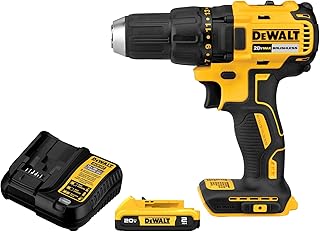
Fortunately, most issues are common and can be fixed with a bit of troubleshooting. This ultimate guide will walk you through diagnosing and solving the most frequent Dewalt drill problems, from power issues to mechanical failures. Whether you need a simple fix or are considering an upgrade to a new model like the top-rated DEWALT 20V MAX Cordless Drill Driver Kit (DCD771C2), we have the expert insights you need.
Quick Troubleshooting Guide: Is It the Battery, the Charger, or the Drill?
When your Dewalt drill won’t work, the first step is to isolate the problem’s source. Is it a lack of power, or is the tool itself faulty? This systematic approach saves time and helps you pinpoint the exact component that needs attention.
Start by checking the most obvious and common culprits: the battery and the charger. Power-related issues account for a vast majority of failures. Before you assume the worst about your Dewalt drill, perform these initial checks to quickly narrow down the possibilities.
| Symptom | Possible Cause | Quick Check |
|---|---|---|
| Drill is completely dead | Dead Battery / Faulty Charger | Test the battery in another 20V MAX tool. Try a different, known-good battery in the drill. |
| Drill has low power / dies quickly | Failing Battery | Fully charge the battery and observe its runtime under a normal load. |
| Drill works, but battery won’t charge | Faulty Charger / Bad Battery | Check the charger’s indicator lights. Test with a different battery. |
| Drill sparks or smokes | Worn Carbon Brushes / Motor Issue | Stop use immediately. Inspect the motor vents for signs of internal damage. |
| Chuck is stuck / won’t tighten | Debris in Chuck / Mechanical Failure | Attempt to manually release the chuck. Inspect the jaws for dirt or damage. |
The Heart of the Problem: Dewalt Drill Battery and Charger Issues
The 20V MAX battery platform is the lifeblood of your cordless Dewalt drill. When the tool fails, this is the first place you should look. A faulty battery or charger can mimic the symptoms of a completely broken drill.
Dead or Dying Battery
A battery that won’t hold a charge is a common issue, especially after years of heavy use. Lithium-ion batteries have a finite lifespan and their capacity diminishes over time. Proper care can extend their life, but they will eventually need to be replaced.
Signs of a failing Dewalt drill battery include:
- The drill has noticeably less power or torque than it used to.
- The battery dies very quickly, even after a full charging cycle.
- The battery doesn’t charge at all, and the charger light indicates an error.
To test your battery, first ensure it’s fully seated in the drill and the charger. Clean the metal contacts on both the battery and the tool with a dry cloth to remove any dirt or grime that could interfere with the connection. If the problem persists, the battery is likely the cause. According to Battery University, avoiding extreme temperatures and not storing batteries in a fully discharged state can significantly prolong their life.
Faulty Charger
Sometimes the battery is fine, but the charger is the culprit. A faulty charger won’t deliver the necessary power, leaving you with a dead battery and a non-functional Dewalt drill.
Start by examining the charger’s indicator lights. A solid red light typically means it’s charging, while a green light means it’s complete. A blinking red light often signals a problem, such as the battery being too hot or too cold, or a more serious internal fault. Consult your Dewalt manual or the official Dewalt support page for a specific breakdown of what the light patterns mean for your model. If the charger shows no lights at all, check the outlet to ensure it has power.
Mechanical and Electrical Failures Within Your Dewalt Drill
If you’ve ruled out the battery and charger, the problem lies within the drill itself. These issues can range from a simple switch replacement to a more complex motor problem. Always disconnect the battery before attempting any internal inspection or repair on your Dewalt drill.
The Trigger Switch: No Response When You Pull
You pull the trigger, and nothing happens. The battery is charged, but the Dewalt drill is completely unresponsive. This often points to a faulty variable speed trigger switch, which can wear out from repeated use.
To diagnose a bad switch, you’ll need a multimeter to test for continuity. After safely disassembling the drill’s housing, disconnect the switch from the motor. Set your multimeter to the continuity setting (it often has a sound icon) and place the probes on the switch’s terminals. When you press the trigger, the multimeter should beep, indicating a closed circuit. If there’s no beep, the switch is broken and needs to be replaced.
Motor Problems: When Your Dewalt Drill Smokes or Smells
Smoke or a distinct burning smell coming from your drill is a major red flag. This usually indicates a severe motor problem, often caused by overloading the tool or by worn-out carbon brushes. Stop using the drill immediately to prevent further damage.
In brushed motor models, carbon brushes are designed to wear down over time. These small blocks conduct electricity to the motor’s commutator. When they become too short, they make poor contact, causing sparking, loss of power, and excessive heat. Inspecting and replacing brushes is a standard maintenance task. For a more durable and efficient option, consider a brushless model like the DEWALT 20V MAX Cordless Drill Driver (DCD777D1), as their motors have fewer wearable parts and run cooler.
Common Chuck and Clutch Complications
The chuck and clutch are the business end of your Dewalt drill. They are responsible for holding the bit and managing torque. Issues here can prevent you from drilling effectively, even if the motor is running perfectly.
Stuck or Jammed Drill Chuck
A keyless chuck that refuses to open or close is a common annoyance. This can happen if it’s over-tightened or if dirt and debris have worked their way into the mechanism. Don’t immediately reach for a massive wrench, as you can damage the gearing.
Methods to unstick a Dewalt drill chuck:
- Use Rubber Grip: Wear a pair of rubberized gloves to get a better grip and try to twist it open manually.
- Strap Wrenches: Use two strap wrenches, one on the base of the chuck and one on the sleeve, and turn them in opposite directions.
- Tap and Release: Unplug the drill, secure the short end of a large Allen wrench into the chuck, and tighten it as much as possible. Gently tap the long end of the wrench with a mallet in the counter-clockwise direction to break it free.
Regularly cleaning the chuck with compressed air can prevent this from happening. As highlighted by experts at Pro Tool Reviews, keeping your tools clean is one of the most effective ways to ensure their longevity.
Clutch Slipping or Not Engaging
The adjustable clutch (the numbered collar behind the chuck) is designed to slip at a certain torque to prevent you from stripping screws or damaging your workpiece. If you hear a loud clicking or grinding noise and the bit stops turning under load, the clutch is doing its job. However, if it slips on a high setting with minimal resistance, there may be a problem.
First, ensure the clutch is not set to the “drill” symbol, which disengages the clutch for maximum torque. If it’s slipping on the highest number settings, the internal clutch mechanism may be worn. For many DIY users, a damaged clutch on an old Dewalt drill often means it’s time for a replacement.
When to Repair vs. When to Replace Your Dewalt Drill
Deciding whether to fix a broken tool or buy a new one comes down to cost, time, and need. A simple repair like replacing carbon brushes or a trigger switch can be very cost-effective. However, if the motor or transmission is gone, the repair cost can quickly approach the price of a brand-new drill.
Consider the age of your tool and batteries. Investing in new batteries and parts for a decade-old drill might not be wise when newer models offer brushless motors, better ergonomics, and more power. For a great value, combo kits often provide the best path forward.
| Repair / Replacement | Estimated Cost | Recommendation |
|---|---|---|
| New 20V Battery | $50 – $90 | Worth it if the drill is in good shape. |
| New Trigger Switch | $20 – $40 | A very cost-effective DIY repair. |
| Carbon Brush Set | $10 – $20 | A cheap and easy maintenance fix. |
| Motor Replacement | $60 – $120+ | Often not worth it; consider a new drill. |
| New Drill Kit | $99 – $170 | Often the best value for money. |
The DEWALT 20V MAX Cordless Drill and Impact Driver Combo Kit (DCK240C2) is an excellent replacement choice, giving you two powerful tools, two batteries, and a charger for a fantastic price.

For those wanting to upgrade to brushless technology, the DEWALT 20V MAX Brushless 2-Tool Combo Kit (DCK277D2) offers increased runtime and motor life.
Preventive Maintenance for Your Dewalt Drill
The best way to fix a broken Dewalt drill is to prevent it from breaking in the first place. A few simple maintenance habits can dramatically extend the life of your tool and ensure it’s ready to go when you need it.
- Keep It Clean: Use compressed air to blow dust out of the motor vents after each use. A buildup of sawdust can cause overheating.
- Store It Properly: Keep your drill in its case in a clean, dry environment. Avoid extreme temperatures, which can degrade the battery and internal lubricants.
- Don’t Overload It: Use the right tool for the job. Pushing a compact drill too hard on a task meant for a heavy-duty model will lead to premature motor burnout.
- Use Sharp Bits: A dull drill bit forces the motor to work much harder, generating excess heat and strain.
- Charge Batteries Correctly: Don’t leave a battery on the charger indefinitely after it’s full (though modern chargers have auto shut-off). Store batteries with a partial charge if they won’t be used for a long time.
Conclusion: Getting Your Dewalt Drill Back in Action
When your Dewalt drill stops working, don’t panic. By systematically checking the battery, charger, switch, and motor, you can diagnose the problem with confidence. Many fixes are simple and affordable, allowing you to get your trusted tool back into service quickly.
However, it’s also important to know when it’s time to retire an old tool. With the advancements in brushless motor technology and battery efficiency, a new Dewalt drill can offer a significant upgrade in performance and longevity. For a complete package to tackle any project, consider the DEWALT 20V MAX* Cordless Drill/Driver Kit with 100-Piece Bit Set (DCD771C2 & DWA2FTS100), ensuring you have a reliable drill and every accessory you could need.