
Your Dewalt cordless drill is the workhorse of your toolkit, but its power is only as good as its battery life. A dead battery in the middle of a project is frustrating and inefficient. This guide provides an exhaustive deep-dive into the expert strategies and best practices to extend the runtime and overall lifespan of your batteries, ensuring your tool is always ready when you are.
Whether you’re a professional on a job site or a DIY enthusiast tackling a weekend project, these tips will help you get the absolute most out of your power tool investment. We’ll cover everything from the science behind the batteries to the subtle usage techniques that make a huge difference. For those looking for a reliable starting point or an upgrade, the DEWALT 20V Max Cordless Drill Driver Set (DCD771C2) is a top-rated choice, known for its balance of power and value.
This ultimate guide will ensure you have the knowledge to properly care for and operate your Dewalt cordless drill for peak performance. By understanding the technology and implementing these pro tips, you can significantly boost the battery efficiency of your Dewalt cordless drill.
Understanding Your Dewalt Cordless Drill Battery: The Power Behind the Performance
The battery is the heart of your tool. Understanding its technology is the first step toward maximizing its potential. Modern power tool batteries are marvels of engineering, a far cry from the heavy, inefficient power packs of the past.
Knowing the difference between battery types and what the specifications on the side of the battery mean will empower you to make smarter usage and purchasing decisions. This foundational knowledge is crucial for the proper care of your Dewalt cordless drill and its power source. Let’s unlock the technology that drives your Dewalt cordless drill.
The Evolution of Dewalt Batteries: From NiCd to Lithium-Ion
Early cordless tools relied on Nickel-Cadmium (NiCd) batteries. While revolutionary at the time, they suffered from “memory effect,” where a battery would lose capacity if it was repeatedly recharged before being fully drained. They were also heavier and contained toxic heavy metals, posing environmental concerns.
Today, Dewalt’s 20V MAX line uses Lithium-Ion (Li-Ion) technology, a significant upgrade. Li-Ion batteries are lighter, hold a charge longer in storage, and deliver fade-free power, meaning they provide full power until the battery is depleted. Most importantly, as noted by experts at Techtronic Industries, Li-Ion batteries do not suffer from the memory effect, so you can “top them off” without damaging their long-term health. This makes managing the power for your Dewalt cordless drill much more convenient. This advanced battery chemistry is a key reason for the superior performance of any modern Dewalt cordless drill.
Decoding the Specs: Volts (V), Amp-Hours (Ah), and What They Mean for Your Dewalt Cordless Drill
When you look at a Dewalt battery, you’ll see two key numbers: Volts (V) and Amp-Hours (Ah). Understanding these is simple and essential.
- Volts (V): Think of voltage as the “horsepower” of the drill. It measures the potential power output. The Dewalt 20V MAX system provides ample power for a vast range of professional and DIY applications, from drilling into dense hardwood to driving long screws.
- Amp-Hours (Ah): Think of amp-hours as the “gas tank” of the battery. It measures the battery’s capacity or how long it can run before needing a recharge. A 2.0Ah battery can deliver a certain amount of current for a longer period than a 1.3Ah battery, giving you more runtime.
When you purchase a kit like the DEWALT 20V MAX Brushless 2-Tool Combo Kit (DCK277D2), it includes 2.0Ah batteries, offering a great balance of performance and runtime for your Dewalt cordless drill. For extended tasks, having a higher Ah battery means less downtime for your Dewalt cordless drill.
The Golden Rules of Charging: Best Practices for Your Dewalt Cordless Drill
Proper charging is the single most important factor in determining the long-term health and lifespan of your batteries. Bad habits can permanently reduce a battery’s capacity and lead to premature failure.
Following a few simple rules will protect your investment and ensure you get hundreds of charge cycles out of each battery. These best practices apply to every model, from basic homeowner drills to the most powerful professional-grade Dewalt cordless drill. Treat your batteries well, and your Dewalt cordless drill will reward you with reliable performance.
Avoid the Extremes: Temperature’s Impact on Charging
Lithium-Ion batteries are sensitive to temperature. Attempting to charge a battery when it is too hot or too cold can cause irreversible damage to the internal cells. Dewalt chargers have built-in protection and will often show a warning light if the battery is outside the optimal temperature range.
- Ideal Charging Temperature: The sweet spot for charging is between 40°F and 104°F (4°C and 40°C).
- Avoid Hot Environments: Never leave your batteries or charger in a hot car or in direct sunlight. If a battery is hot to the touch after heavy use, let it cool down for 15-20 minutes before placing it on the charger.
- Avoid Cold Environments: Do not try to charge a frozen battery. Bring it indoors and allow it to warm up to room temperature first. As research from the University of Michigan’s Battery Lab highlights, charging Li-ion cells below freezing can lead to permanent metallic lithium plating and a risk of cell failure.
The Right Way to Charge Your Dewalt Cordless Drill Battery
Dewalt’s 20V MAX chargers are designed to be user-friendly and protect the battery. The process is straightforward, but consistency is key.
- Insert the Battery: Slide the battery firmly onto the charger until it clicks into place.
- Monitor the Indicator: The charger’s LED light will blink to indicate that it’s charging. Once charging is complete, the light will turn solid (no longer blinking).
- Remove When Charged: While modern chargers have protection circuits, it is best practice to remove the battery once it is fully charged to promote its long-term health.
- “Topping Off” is OK: As mentioned, Li-Ion batteries do not have a memory effect. You do not need to fully deplete your battery before recharging. Placing a half-used battery on the charger is perfectly fine and will not harm it.
This simple routine will preserve the health of the power source for your Dewalt cordless drill. Consistently applying these steps will maximize the lifespan of the batteries for your Dewalt cordless drill.
Choosing the Right Charger for Your Dewalt Cordless Drill
Always use the official Dewalt charger that is compatible with your battery system. Kits like the DEWALT 20V MAX Cordless Drill Driver Set (DCD777D1) include the perfectly matched charger for the included battery. Using third-party or counterfeit chargers can be dangerous, posing a fire risk and potentially damaging your batteries beyond repair.
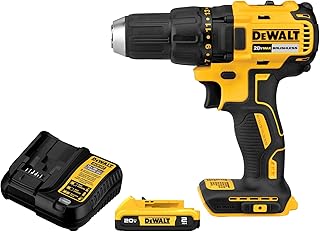
Dewalt offers standard chargers, which typically charge a 2.0Ah battery in about 60-90 minutes, and fast chargers, which can significantly reduce that time. A fast charger is a great investment for professionals who need to cycle through batteries quickly on the job site.
Pro-Level Usage Techniques to Extend Dewalt Cordless Drill Runtimes
How you use your drill has a direct impact on how much work you get done per charge. Pushing the tool too hard forces the motor to draw more current, draining the battery faster.
By adopting a few professional techniques, you can work more efficiently and extend the runtime of every battery charge. These small adjustments in how you handle your Dewalt cordless drill can add up to significant gains in productivity and reduce wear and tear on your Dewalt cordless drill.
It’s All in the Technique: Drilling and Driving for Efficiency
Efficient operation is not about speed; it’s about smart application of force and selecting the right settings.
- Let the Tool Do the Work: Don’t apply excessive downward pressure when drilling. This creates friction and heat, which wastes energy. Apply steady, moderate pressure and let the sharpness of the bit do the cutting.
- Use the Right Speed Setting: Most Dewalt drills have a 2-speed gearbox. Use the high-speed setting (2) for drilling small holes and the low-speed, high-torque setting (1) for driving large screws or using hole saws. Using the wrong speed overloads the motor.
- Use Sharp, High-Quality Bits: A dull drill bit requires much more force to cut, which strains the motor and drains the battery. As publications like Pro Tool Reviews consistently demonstrate, a sharp bit cuts faster and uses less energy. Investing in a quality set, like the one included in the DEWALT 20V MAX* Drill/Driver Kit with 100-Piece Bit Set (DCD771C2 & DWA2FTS100), pays off in performance and battery life.

Brushless vs. Brushed Motors: A Game Changer for Your Dewalt Cordless Drill’s Battery
One of the most significant advancements in cordless tool technology is the brushless motor. Traditional brushed motors use small carbon brushes to transmit electricity, which creates friction, heat, and wasted energy.
Brushless motors use electronics to control the motor, eliminating the friction of brushes. This results in a motor that is far more efficient, runs cooler, and adapts its power output to the task at hand. According to Dewalt’s own technical specifications, brushless motors can deliver up to 57% more runtime compared to their brushed counterparts. For anyone who uses their Dewalt cordless drill extensively, upgrading to a brushless model like the one in the DEWALT 20V MAX Brushless 2-Tool Power Tool Combo Kit (DCK277D2) is a smart investment that pays for itself in increased efficiency and longer battery life. A brushless Dewalt cordless drill is the professional’s choice.

Proper Storage and Maintenance for Long-Term Battery Health
What you do with your tool and batteries when they’re not in use is just as important as how you use them. Proper storage and basic maintenance prevent gradual degradation and ensure your equipment is in top condition for years to come.
A little preventative care goes a long way in protecting your investment. By following these storage and maintenance guidelines for your Dewalt cordless drill, you can avoid the common issues that shorten battery lifespan. This ensures your Dewalt cordless drill is always ready for the next job.
Storing Your Dewalt Cordless Drill and Its Batteries Correctly
Where and how you store your batteries can have a major impact on their long-term capacity.
- Store in a Cool, Dry Place: The ideal storage location is indoors, away from extreme temperatures and moisture. A garage or shed that experiences wild temperature swings is not ideal.
- Avoid the Charger: Do not store your batteries on the charger. Once charging is complete, remove the battery and store it separately.
- Long-Term Storage: If you plan to store a battery for several months, discharge it to approximately 50% capacity. Storing a Li-Ion battery at 100% or 0% for an extended period can accelerate capacity loss.
Essential Maintenance for Your Dewalt Cordless Drill
A well-maintained tool runs more efficiently, placing less strain on the battery.
- Keep Vents Clear: Regularly blow out the motor vents on your drill with compressed air to prevent dust buildup, which can cause the motor to overheat.
- Clean the Battery Contacts: Periodically inspect the metal contacts on both the battery and the tool. If they are dirty, wipe them clean with a dry cloth to ensure a solid electrical connection.
- Inspect for Damage: Before each use, give your batteries a quick visual inspection. If you see any cracks in the housing or other signs of damage, discontinue use and replace the battery.
Choosing the Right Dewalt Cordless Drill Kit for Your Needs
Dewalt offers a wide range of drills and kits, and choosing the right one depends on your specific needs and budget. A combo kit often provides the best value, giving you two versatile tools, batteries, a charger, and a bag.
Understanding the key differences between the models will help you select the perfect Dewalt cordless drill kit. Whether you need a compact drill for household tasks or a powerful brushless combo for demanding jobs, there is a Dewalt cordless drill solution available.
Comparing Popular Dewalt Cordless Drill Models
This table breaks down some of the most popular and highly-rated kits available, helping you compare them at a glance.
| Model & Kit | Motor Type | Included Batteries | Price | Rating | Key Feature |
|---|---|---|---|---|---|
| DCK240C2 Drill & Impact Driver | Brushed | (2) 1.3Ah | $149.00 | 4.7 | Excellent value combo kit for general use. |
| DCD771C2 Drill/Driver Set | Brushed | (2) 1.3Ah | $99.00 | 4.8 | High-performance motor, fantastic entry point. |
| DCD777D1 Drill/Driver Set | Brushless | (1) 2.0Ah | $99.00 | 4.8 | Affordable brushless option for improved runtime. |
| DCK277D2 Drill & Impact Driver | Brushless | (2) 2.0Ah | $169.00 | 4.8 | Professional-grade brushless performance. |
| DCD771C2 & Bit Set | Brushed | (2) 1.3Ah | $164.99 | 4.9 | All-in-one kit with a comprehensive bit set. |
Featured Dewalt Cordless Drill Kit
For users who need both drilling and driving capabilities, the DEWALT 20V MAX Cordless Drill and Impact Driver Combo Kit (DCK240C2) represents one of the best values on the market. It bundles a versatile drill/driver with a powerful impact driver, which excels at sinking long screws and bolts without stripping them. This kit provides two core tools for any project, ensuring you have the right tool for the job.

Frequently Asked Questions (FAQ) About Dewalt Cordless Drill Batteries
Can I leave my Dewalt battery on the charger?
While Dewalt chargers have an automatic shut-off to prevent overcharging, the best practice for long-term health is to remove the battery once it’s fully charged.
How long does a Dewalt 20V battery last?
The lifespan depends on usage, storage, and charging habits. With proper care as outlined in this guide, a Dewalt 20V MAX battery should last for 3+ years or several hundred charge cycles. Runtime per charge varies based on the Ah rating and the application’s intensity.
Is it okay to use a generic battery with my Dewalt cordless drill?
It is strongly recommended to only use genuine Dewalt batteries. Off-brand batteries may not have the same safety features, can deliver inconsistent power, void your tool’s warranty, and pose a potential fire hazard. The performance and safety of an authentic battery are worth the investment for your Dewalt cordless drill.
Conclusion: Get the Most Out of Your Dewalt Cordless Drill
Maximizing the battery life of your Dewalt cordless drill is not about a single secret trick, but rather a combination of understanding the technology, adopting best practices for charging and storage, and using the tool efficiently. By implementing these professional tips, you will not only get more work done on a single charge but also significantly extend the overall lifespan of your expensive batteries.
From choosing a model with a brushless motor to simply using a sharp drill bit, every step you take contributes to better performance and long-term value. Treat your batteries with care, and your reliable Dewalt cordless drill will be ready to tackle any project you throw at it for years to come.