

Drill drivers are often seen as woodworking tools, but they’re equally capable in metalworking when used correctly. The key lies in understanding the right settings, choosing the proper bits, and following best practices. Whether you’re drilling through steel brackets or aluminum sheets, a drill driver can deliver clean, accurate holes.
This guide covers everything you need to know about using a drill driver for metal. You’ll learn about speed and torque adjustments, bit selection, and techniques that prevent damage to both the tool and your workpiece. Let’s dive in.
Understanding Metalworking with a Drill Driver
Metalworking demands higher torque and lower speeds than woodworking. Most drill drivers offer variable-speed triggers and adjustable clutches, making them suitable for metals like mild steel, aluminum, and brass. However, stainless steel or hardened alloys require extra care—and sometimes a dedicated drill press.
The best drill drivers for metal have brushless motors for efficiency and consistent power delivery. For heavier jobs, a corded model or a high-torque 20V max system works well.
If you’re new to metal drilling, start with softer metals like aluminum. This helps you learn speed control without overwhelming the tool. For woodworking applications, see our guide on Best Drill Driver Uses in Woodworking, Cabinetry, and Finish Work.
Choosing the Right Drill Bits for Metal
The bit is the most critical factor in metalworking. Standard wood bits can dull quickly or break. Always use bits designed for metal.
Types of metal drill bits:
- High-Speed Steel (HSS): Affordable, good for soft metals and general use.
- Cobalt HSS: Heat-resistant, ideal for stainless steel and harder alloys.
- Titanium-coated: Extended life, reduces friction, works on most metals.
- Step bits: Cone-shaped, great for thin sheet metal and creating multiple hole sizes.
A quality bit set like the DEWALT Screwdriver Bit Set with Tough Case, 45-Piece (DW2166) includes both driving and drilling bits for metal work. The tough case keeps everything organized on the job site.
Pro tip: Use cutting oil or lubricant when drilling steel. It cools the bit, reduces friction, and extends bit life.
Essential Settings for Drilling Metal
Getting the settings right prevents overheating, bit breakage, and motor strain. Follow these guidelines:
Speed (RPM)
- Steel & stainless steel: Low speed – around 500–1000 RPM.
- Aluminum & brass: Medium speed – 1000–2000 RPM.
- Thin sheet metal: High speed with light pressure to avoid tearing.
Most drill drivers have a two-speed gearbox. Use the low gear (1) for drilling metal. The high gear (2) is for wood and driving screws.
Torque and Clutch
Set the clutch to a lower torque setting when starting the hole. This prevents the drill from catching and spinning out of control. Once the bit is through, you can increase torque for faster drilling.
For heavy-duty drilling, some models like the DEWALT 20V Max Cordless Drill Driver Set (DCD771C2) offer high-performance motors with plenty of torque for metal.
Best Practices for Safety and Precision
Metal drilling involves sharp chips, heat, and potential kickback. Here’s how to stay safe and get clean holes:
- Always clamp the workpiece – Metal moves more than wood. Secure it with a vise or clamps.
- Start with a pilot hole – Use a small bit (1/8″) first, then enlarge with the final size. This reduces wander and stress.
- Use lubrication – Cutting oil or even WD-40 helps. Apply a few drops to the bit and hole.
- Peck drilling – For deep holes, pull the bit out frequently to clear chips and let it cool.
- Wear safety glasses – Metal chips fly fast. Also consider ear protection.
Avoid runout: Ensure the bit is centered in the chuck. A wobbling bit can break and damage your workpiece.
For renovation work where you’re drilling into masonry or concrete, note that drill drivers are not ideal—check our article on Masonry and Renovation with Drill Drivers: When They Work and When They Do Not.
Recommended Drill Drivers for Metalworking
For consistent metal drilling, you need a drill driver with good low-speed torque, a metal chuck, and ergonomic grip. Here are some top choices from our selection:
Comparison Table
| Product | Image | Price | Rating | Buy Now |
|---|---|---|---|---|
| DEWALT 20V Max Cordless Drill Driver Set (DCD771C2) |  |
$89.10 | 4.8 | Buy at Amazon |
| DEWALT 20V MAX Cordless Drill Driver Set (DCD777D1) | 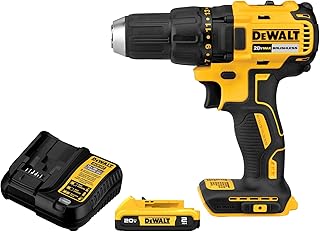 |
$89.10 | 4.7 | Buy at Amazon |
| CRAFTSMAN V20 MAX Cordless Drill Driver and Impact Driver Set (CMCK200C2) | 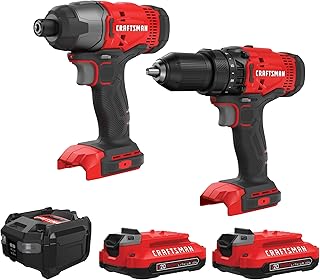 |
$99.00 | 4.8 | Buy at Amazon |
| PULITUO 20V Cordless Drill/Driver (Green) |  |
$35.99 | 4.5 | Buy at Amazon |
| DEWALT 20V MAX Cordless Drill and Impact Driver (DCK277D2) |  |
$152.10 | 4.8 | Buy at Amazon |
The DEWALT 20V Max Cordless Drill Driver Set (DCD771C2) is a solid entry-level option with a high-performance motor rated for metal drilling. For a brushless upgrade, the DEWALT 20V MAX Cordless Drill Driver Set (DCD777D1) offers better runtime and compactness.
If you need both driving and drilling on metal, the CRAFTSMAN V20 MAX Set (CMCK200C2) gives you a drill driver plus an impact driver. The impact driver is great for fastening metal screws.
Budget-conscious users can rely on the PULITUO 20V Cordless Drill/Driver for light-duty metal drilling. It includes two batteries and a torque adjustment ring.
Conclusion
Drill drivers can handle metalworking when you match the right bits, speeds, and techniques. Start with low speed, use lubrication, and always protect your eyes. A high-quality drill driver from a trusted brand makes the job easier and safer.
Remember that not every project is suited for a drill driver. For heavy-duty steel or thick plates, consider a drill press. But for most home and professional metal tasks, your drill driver is more than enough.
Now go ahead and put these best practices into action. With the right settings and bits, you’ll drill through metal like a pro.