

A drill driver is one of the most versatile tools in any workshop. Whether you’re driving screws into soft pine, drilling through stainless steel, boring into concrete, or maneuvering in a cramped crawlspace, safety should always come first. One wrong move can lead to broken bits, damaged materials, or serious injury.
This guide covers essential safety tips for the four most common drilling scenarios—wood, metal, masonry, and tight spaces. We’ll also highlight high-quality drill drivers that make the job safer and easier. For deeper troubleshooting and maintenance advice, check out our companion guides on Drill Driver Not Working? Common Problems and Simple Fixes and How to Maintain a Drill Driver for Longer Battery Life and Better Performance?.
General Safety Rules for Every Drilling Task
Before we dive into material-specific tips, here are safety basics that apply every time you pick up a drill driver.
- Wear proper PPE. Safety glasses protect your eyes from flying debris. Earplugs reduce noise from high-speed drilling on metal or masonry. Gloves with good grip prevent slipping, but avoid loose gloves that could get caught in the chuck.
- Secure your workpiece. Use clamps or a vise to hold the material. Never hold a piece by hand while drilling—if the bit catches, the workpiece can spin and injure you.
- Check the drill driver’s condition. Ensure the chuck is tight, the battery is fully charged, and there are no cracks in the housing. A tool like the DEWALT 20V Max Cordless Drill Driver Set (DCD771C2) offers rugged construction and a comfortable grip, reducing user fatigue.
- Use the right bit for the job. Dull or incorrect bits increase friction, create heat, and can cause kickback.
- Maintain a stable stance. Stand with feet shoulder-width apart, and keep the drill perpendicular to the surface. Anticipate the bit breaking through to avoid sudden lunge.
Always follow the manufacturer’s instructions for your specific model. A well-maintained tool is a safer tool.
Safety Tips for Drilling into Wood
Wood is forgiving, but it still demands attention. Softwoods like pine splinter easily, while hardwoods like oak can grab a bit aggressively.
1. Avoid tear-out with a pilot hole. Use a smaller drill bit to start, then step up to the final size. This reduces splintering on the exit side.
2. Clear sawdust frequently. Sawdust buildup can block the flutes of the bit, causing overheating. Slow down or back the bit out occasionally.
3. Use a depth stop. Many drill drivers, including the DEWALT 20V MAX Cordless Drill Driver Set (DCD777D1), feature adjustable clutch settings that prevent over-driving screws. Set the clutch to a low number when driving into soft wood to avoid stripping the head or splitting the board.
4. Beware of knots. Drilling into a knot can cause the bit to wander or snap. Apply steady pressure and let the tool do the work.
For a budget-friendly option that handles wood well, the PULITUO 20V Cordless Drill/Driver offers 21+ torque settings perfect for woodworking projects.
Safety Tips for Drilling into Metal
Metal drilling creates sparks, heat, and sharp burrs. It requires slower speeds and a firm grip.
1. Use cutting oil. Lubrication reduces heat and extends bit life. For steel, apply oil every few seconds. For aluminum, use kerosene or a light oil. Never drill dry.
2. Start with a center punch. This prevents the bit from skidding across the surface. A single sharp tap with a punch creates a dimple that guides the drill.
3. Slow your speed. Metal needs slower RPMs. If your drill driver has variable speed, start at the lowest setting and increase gradually. The CRAFTSMAN V20 MAX Cordless Drill Driver and Impact Driver Set (CMCK200C2) gives you two speed ranges (0-500 and 0-2000 RPM), ideal for switching between metal and wood.
4. Clamp down thin sheets. Thin metal can vibrate or spin. Use a backing block (wood) behind the sheet to prevent deformation.
5. Clear sharp chips. Long, ribbon-like chips are dangerous—they can cut you. Stop drilling and break them off with pliers.
If you frequently work with metal, consider a DEWALT 20V MAX Cordless Drill and Impact Driver Combo Kit (DCK240C2). The impact driver delivers high torque for fasteners, while the drill handles precise holes in steel.
Safety Tips for Drilling into Masonry (Brick, Concrete, Stone)
Masonry is the toughest material for a standard drill driver. It generates dust, heat, and vibration.
1. Use the right bit. Only use carbide-tipped masonry bits. Standard twist bits will dull instantly.
2. Activate hammer mode if available. A hammer drill (or a drill driver with a hammer function) hammers while rotating. None of the drills listed here are true hammer drills, but you can still drill into soft masonry (brick, cinder block) with steady pressure and a masonry bit. For concrete, you really need a dedicated hammer drill.
3. Wear a dust mask. Silica dust from concrete is hazardous. Use a vacuum attachment or wet drilling to control dust.
4. Let the bit do the work. Push firmly but don’t force. Too much pressure can overheat the bit or damage the motor. Pull the bit out periodically to clear dust.
5. Secure the workpiece. Masonry tends to crack if not supported. If drilling near the edge of a block, drill at least 1 inch from the edge.
For heavy masonry work, upgrade to a tool like the DEWALT 20V MAX Cordless Drill and Impact Driver Brushless Combo Kit (DCK277D2). Its brushless motor provides longer runtime and durability under load, which helps when drilling into tough materials.
Safety Tips for Drilling in Tight Spaces
Attics, under sinks, behind cabinets—tight spaces test both your skill and your equipment.
1. Use a compact drill driver. Full-size drills are hard to maneuver. Look for a short-bodied model like the DEKOPRO 20V Cordless Drill, which is lightweight and easy to handle in confined areas.
2. Mind your free hand. In tight spots, your second hand may be bracing against a wall or support beam. Keep fingers clear of the drill’s air vents and the rotating chuck.
3. Protect electrical wires and pipes. Before drilling into any wall or ceiling, use a stud finder to locate hazards. Never assume the space is clear.
4. Use a right-angle attachment. If your drill driver doesn’t fit, an accessory extension can help. Alternatively, a drill with an offset chuck or a flexible shaft is invaluable.
5. Watch for pinch points. Cramped quarters increase the risk of getting your hand caught between the drill and a hard surface. Go slow, and keep your fingers away from moving parts.
For a versatile setup that handles tight spaces and general tasks, the CRAFTSMAN 20V MAX Impact Driver Kit (CMCF800C1) is a great companion. Its 1/4-inch hex chuck accepts bits quickly, and the compact design fits where a full drill won’t.
Comparison Table: Top Drill Drivers for Safe Drilling
The table below compares three excellent drill drivers from our selected products. Each offers features that enhance safety across different materials.
| Product | Image | Price | Rating | Key Safety Features | Buy at Amazon |
|---|---|---|---|---|---|
| DEWALT 20V Max Cordless Drill Driver Set (DCD771C2) |  |
$89.10 | 4.8 | 2-speed transmission, ergonomic grip, LED light for dark spaces, high-performance motor reduces stalling | Buy at Amazon |
| CRAFTSMAN V20 MAX Cordless Drill Driver and Impact Driver Set (CMCK200C2) | 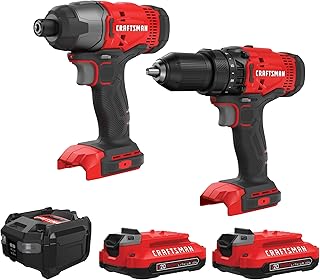 |
$99.00 | 4.8 | Two tools for versatility, variable speed triggers, LED work light, bag for organized storage | Buy at Amazon |
| DEWALT 20V MAX Cordless Drill and Impact Driver Brushless Combo Kit (DCK277D2) |  |
$152.10 | 4.8 | Brushless motor for efficiency, 2-speed all-metal transmission, anti-slip grip, LED with delay feature | Buy at Amazon |
All three models come with two batteries, a charger, and a carrying bag, making them ready for any job.
Final Thoughts
Safety with a drill driver isn’t complicated—it’s about preparation, the right technique, and using quality equipment. Whether you’re sinking screws into wood, cutting threads in metal, drilling into masonry, or working in a tight corner, following these tips will keep you and your project safe.
Remember to maintain your drill driver regularly. A clean chuck, sharp bits, and a fully charged battery reduce the risk of accidents. For more advice, read our article on How to Maintain a Drill Driver for Longer Battery Life and Better Performance?.
And if your tool ever acts up, don’t ignore it. Visit Drill Driver Not Working? Common Problems and Simple Fixes to troubleshoot common issues before they become dangerous.
Stay safe, and happy drilling.