

Your drill driver is the workhorse of any toolbox, but even the best models lose their edge without proper care. Regular maintenance not only extends battery life but also ensures consistent torque, speed, and reliability. Whether you use a DEWALT 20V Max Cordless Drill Driver Set (DCD771C2) or a budget-friendly PULITUO 20V Cordless Drill/Driver, a few simple habits can save you money and frustration. In this guide, we cover battery care, mechanical upkeep, performance tips, and top product recommendations to keep your drill running like new.
Why Drill Driver Maintenance Matters
A well-maintained drill driver delivers consistent power, reduces wear on internal components, and prevents premature battery failure. Neglect leads to reduced run time, overheating, and even permanent damage. Good maintenance also enhances safety—something we cover in detail in our dedicated guide on Drill Driver Safety Tips for Wood, Metal, Masonry, and Tight Spaces.
Battery Care: The Heart of Cordless Performance
Lithium‑ion batteries are sensitive to temperature, storage, and charging habits. Follow these rules to maximise their lifespan.
Charge Smart, Not Fast
- Avoid full discharges. Recharge when the battery reaches 20‑30% capacity.
- Use the charger that came with your tool. Third‑party chargers can overheat or under‑charge.
- Unplug once fully charged. Leaving a battery on the charger for days shortens its life.
Store at the Right Temperature
Extreme heat and cold damage cells. Store batteries in a cool, dry place between 50°F and 80°F. Never leave them in a hot garage or freezing car overnight.
Keep Contacts Clean
Dirt and debris on battery terminals cause poor connections and power loss. Wipe them with a dry cloth or use a pencil eraser for stubborn grime.
Mechanical Maintenance: Keep the Drill Running Smoothly
Clean the Chuck and Vents
Dust and sawdust accumulate in the chuck and air intakes, leading to overheating and reduced grip. Use compressed air to blow out debris after every heavy use. For the chuck, occasionally open and close it fully while cleaning.
Lubricate Moving Parts
Apply a drop of light machine oil to the chuck’s internal mechanism every few months. Avoid over‑oiling—too much attracts dust. For brushed motors, check the brushes every 50‑100 hours of use and replace when worn.
Tighten Loose Screws
Vibration loosens housing screws over time. Check and tighten them periodically to prevent rattling and erratic operation.
Performance Optimisation: Get the Most Out of Your Drill
Match Speed and Torque to the Task
Using the wrong settings strains the motor and drains the battery faster. For driving screws, use lower speed and higher torque. For drilling, select the appropriate speed based on material. If your drill has a clutch, set it to avoid cam‑out.
Use Sharp Bits and Proper Technique
Dull bits require more force, which loads the motor and shortens run time. Replace bits when they become blunt. Always start pilot holes in hard materials. For troubleshooting common issues, check our guide on Drill Driver Not Working? Common Problems and Simple Fixes.
Keep the Battery Engaged
If you own multiple batteries, rotate them evenly. A battery that sits unused for months can lose capacity. Use each pack at least once a month to keep cells active.
Essential Accessories That Extend Life
Investing in quality bits, cases, and chargers protects your drill driver over the long haul. For example, a DEWALT Screwdriver Bit Set with Tough Case (DW2166) keeps bits organised and prevents loss, while a sturdy contractor bag like the one included with the CRAFTSMAN V20 MAX Cordless Drill Driver and Impact Driver Set (CMCK200C2) protects your tools from dust and drops.
Top Drill Drivers Compared for Maintenance & Value
We’ve handpicked some of the best models on the market based on battery life, build quality, and ease of maintenance. Click the images to check current prices on Amazon.
 | DEWALT 20V Max Drill Driver Set | $89.10 | 4.8 | 2 XR 1.3Ah batteries, 2‑speed, contractor bag | Buy at Amazon
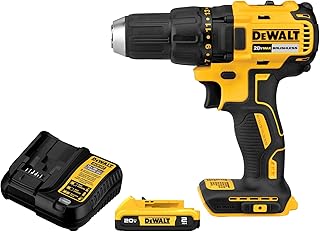 | DEWALT 20V MAX Brushless Drill | $89.10 | 4.7 | Brushless motor, 2.0Ah battery, LED light | Buy at Amazon
 | PULITUO 20V Cordless Drill/Driver | $35.99 | 4.5 | 2 batteries, 30Nm torque, 21+1 torque settings | Buy at Amazon
 | CRAFTSMAN V20 Drill/Driver Kit | $59.00 | 4.7 | 1/2″ chuck, includes battery & charger, LED light | Buy at Amazon
 | DEKOPRO Cordless Drill 20V | $24.79 | 4.5 | Kit with battery, charger, keyless chuck, compact | Buy at Amazon
 | WORX 20V Brushless Drill Driver | $118.92 | 4.8 | 85 bits included, 445 in‑lb, PowerShare batteries | Buy at Amazon
 | COMOWARE 20V Cordless Drill | $31.99 | 4.4 | 1 battery, 25+1 torque, 34‑piece bit set | Buy at Amazon
Final Tips for Long‑Term Performance
- Cycle batteries monthly. Even if you don’t use your drill, run the battery down and recharge it to keep chemistry healthy.
- Inspect the chuck for wear. A loose chuck affects bit grip and causes wobble. Replace it if necessary.
- Store your drill in a dry case. Humidity promotes rust inside the motor and contacts.
By following these maintenance routines, you can double the lifespan of both your drill driver and its batteries. For more in‑depth troubleshooting, refer to our full guides on safety and common fixes linked above.