
Brushless motors have revolutionised cordless power tools. They deliver more torque, longer runtimes, and greater efficiency than brushed alternatives. But even the best brushless motor can overheat when pushed hard on tough jobs. Overheating reduces performance, shortens battery life, and can permanently damage the tool.
Preventing overheating is about smart usage, proper maintenance, and choosing tools built to manage heat. Many top-rated models already incorporate advanced thermal management. For instance, the DEWALT 20V MAX Cordless Drill Driver Set (DCD777D1) combines a brushless motor with LED light and a compact design that helps dissipate heat naturally. In this guide, we’ll cover everything you need to keep your brushless tools cool during heavy use.
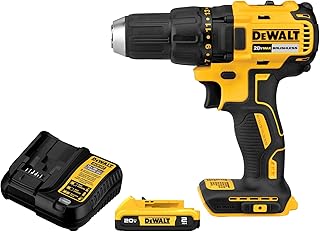
Understanding Why Brushless Motors Overheat
Brushless motors generate heat through electromagnetic resistance and friction. During heavy load—like drilling into concrete or cutting thick hardwood—the motor draws more current, raising internal temperatures.
Key heat sources in brushless tools:
- High torque demands that push current limits
- Poor airflow if vents are blocked by debris or dust
- Overmatched batteries that cannot supply steady voltage
- Extended continuous use without cooldown periods
Unlike brushed motors, brushless designs rely on electronic controllers. These controllers are sensitive to extreme heat. Once the tool’s thermal sensor triggers a shutdown, you must wait for it to cool—often several minutes.
Best Practices to Prevent Overheating
1. Match the Battery to the Task
Using a low‑capacity battery on a high‑demand tool forces the motor to work harder. Choose a battery with sufficient amp-hours (Ah) for the job. For heavy use, opt for 4.0 Ah or larger.
Pro tip: Keep multiple batteries rotated. This allows one pack to cool while you use another. The DEWALT 20V MAX XR Oscillating Tool Kit (DCS356C1) ships with a battery and charger, and its brushless motor is optimised for extended runtime without overheating.

2. Avoid Overloading the Motor
Overloading means applying more pressure or force than the tool is designed for. Let the tool do the work.
- For drills, use a sharp bit and let the speed and torque do the cutting.
- For oscillating tools, use the correct blade for the material.
- For rotary tools like the Dremel 8150 8V Cordless Rotary Tool Kit, choose the right accessory and speed setting (5,000–30,000 RPM) to avoid bogging down.

3. Take Strategic Breaks
Every brushless tool benefits from intermittent use. The motor’s electronic controller needs time to shed heat. A good rule of thumb is 15 minutes of continuous heavy use followed by a 5‑minute cooldown.
4. Keep Air Vents Clean
Dust and debris are the biggest enemies of cooling. Clogged vents trap heat inside the motor housing.
- After each job, blow out vents with compressed air.
- Never use the tool in extremely dusty environments without a protective cover.
- Store tools in a dry, clean location.
5. Use the Correct Speed and Torque Settings
Many brushless tools offer variable speed or torque settings. Running at full speed when you only need light work generates unnecessary heat. For example, a jigsaw like the DEWALT 20V MAX XR Jig Saw (DCS334B) has a variable speed trigger and a brushless motor that adjusts power delivery. Matching the speed to the material reduces thermal stress.

6. Use the Tool’s Built‑in Safety Features
Modern brushless tools often include electronic brakes, LED load indicators, and thermal shutdown. These are not gimmicks—they protect the tool and you. For instance, the DEWALT 20V MAX XR Oscillating Multi‑Tool (DCS356B) features three speed settings and an LED light, making it easier to see your work and avoid stalling.

Tools Designed for High‑Heat Resistance
Many brushless cordless tools now include thermal management systems. The table below compares seven top‑rated models we recommend for heavy‑duty use. Each product is built with motor cooling in mind.
| Product | Price | Rating | Key Heat‑Management Feature | Buy at Amazon |
|---|---|---|---|---|
| DEWALT 20V MAX Drill Driver |
$99.00 | 4.7 | Compact housing for better air circulation | Buy Now |
 DEWALT 20V MAX Drill & Impact Combo DEWALT 20V MAX Drill & Impact Combo |
$169.00 | 4.8 | Brushless motors with high‑efficiency design | Buy Now |
| DEWALT 20V MAX XR Oscillating Multi‑Tool |
$104.99 | 4.8 | Variable speed + thermal overload protection | Buy Now |
| Dremel 8150 8V Rotary Tool |
$79.99 | 4.6 | USB‑C rechargeable, LED nose cap, efficient motor | Buy Now |
| DEWALT 20V MAX XR Oscillating Tool Kit |
$124.50 | 4.8 | 3‑speed selector + included battery for consistent power | Buy Now |
| DEWALT 20V MAX XR Jig Saw |
$132.00 | 4.8 | Brushless motor for longer runtime, less heat | Buy Now |
 Dremel 8250-5 12V Rotary Tool Dremel 8250-5 12V Rotary Tool |
$149.00 | 4.7 | 3‑hour battery with charge indicator, low‑heat operation | Buy Now |
All above tools feature brushless motors that inherently run cooler than brushed models. Their robust designs, combined with proper user practices, minimise overheating during heavy use.
Additional Safety Considerations
Overheating isn’t the only hazard. Brushless tools can also experience kickback, bind-ups, or stall if used incorrectly. Learn more in our guide on Kickback, Bind‑ups, and Stall Control: Using Cordless Power Tools with Brushless Motors More Safely.
Maintenance also plays a key role. Regular cleaning and battery care extend tool life and prevent heat buildup. See our Maintenance Routines to Extend the Life of Cordless Power Tools with Brushless Motors and Batteries.
Environmental factors matter. Dust, debris, and moisture can clog vents and cause overheating. Read Dust, Debris, and Moisture: Protecting Electronics in Cordless Power Tools with Brushless Motors on the Jobsite.
Smart features like electronic brakes can also reduce heat by minimising coasting. Explore Using Smart Features: Electronic Brakes and Safety Modes on Cordless Power Tools with Brushless Motors Explained.
Frequently Asked Questions
Why does my brushless tool shut off during heavy use?
This is the thermal overload protection kicking in. The motor controller senses excessive heat and cuts power to prevent damage. Let the tool cool for 10–15 minutes before resuming.
Can I prevent overheating by using a higher‑voltage battery?
Generally yes, but only if the tool is designed for that voltage. Using a battery with a higher amp‑hour rating (e.g., 5.0 Ah instead of 2.0 Ah) delivers steadier current and reduces strain.
Is it safe to use a brushless tool in the rain or extreme heat?
No. Excessive ambient heat or moisture can accelerate overheating. Always operate tools within the temperature range specified in the manual—typically between 0°C and 40°C (32°F–104°F).
How often should I clean the vents?
Clean vents after every major job. If you work in dusty environments, blow out the vents with compressed air daily. Clogged vents are the most common cause of overheating.
What is the best way to cool down a tool quickly?
Do not submerge it in water or use a fan on it—condensation can damage electronics. Simply set it aside in a cool, dry area. Using a second tool or battery while the first cools is the most productive approach.
Final Thoughts
Overheating in brushless cordless power tools is preventable. By matching your battery, avoiding overload, keeping vents clean, and using built‑in safety features, you can keep your tools running cool even during heavy‑duty tasks.
Investing in quality tools with advanced thermal designs—like the DEWALT drill driver or the Dremel rotary tool—makes a significant difference. Follow the practices above, and your brushless tools will deliver consistent performance job after job.