
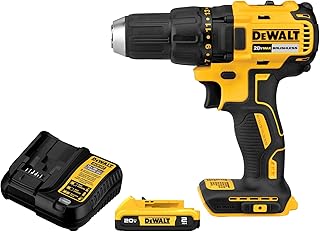
Investing in a cordless power tool with a brushless motor – like the DEWALT 20V MAX Cordless Drill Driver Set DCD777D1 – gives you better efficiency, longer runtime, and less friction than brushed models. But that performance only lasts if you maintain the motor and battery properly. A few smart habits can prevent overheating, kickback, and premature wear.
This guide covers maintenance routines tailored for brushless motors and lithium-ion batteries. You’ll learn cleaning, cooling, storage, and safety checks that keep your tools running like new for years.
Why Brushless Motors Need Specialized Maintenance
Brushless motors use electronic commutation instead of brushes, which means less friction and heat. However, their electronics are sensitive to dust, moisture, and high temperatures. Routine cleaning and cooling are essential to protect the control board and windings.
Without maintenance, debris can block airflow, leading to overheating. Overheating not only shortens motor life but also degrades battery cells. That’s why many top-rated tools like the DEWALT 20V MAX XR Oscillating Multi-Tool DCS356B are built with sealed housings – but you still need to keep vents clear.
Core Battery Maintenance for Longevity
Lithium-ion batteries are the heart of cordless tools. Follow these steps to maximize their lifespan:
- Charge before full depletion. Unlike older chemistries, Li-ion batteries last longer when kept between 20% and 80%. Avoid running them to zero.
- Store at moderate temperatures. Keep batteries at 40–80°F (5–27°C). Extreme heat or cold accelerates capacity loss.
- Use the original charger. Smart chargers from brands like DEWALT and Dremel optimize charge cycles and prevent overvoltage.
- Remove batteries from tools during storage. This prevents parasitic drain and protects the battery’s internal electronics.
For a deep dive on keeping electronics safe, see our guide on Dust, Debris, and Moisture: Protecting Electronics in Cordless Power Tools with Brushless Motors on the Jobsite.
Cleaning Routines for Brushless Motors
Dust and debris are the biggest enemies of brushless motors. They can clog vents and stick to the rotor, causing imbalance and heat.
- Use compressed air after every heavy use session. Blow out vents, the chuck area, and around the trigger.
- Avoid liquid cleaners around the motor housing. A dry microfiber cloth is best for the exterior.
- Inspect the fan (if visible). Some tools like the DEWALT 20V MAX XR Jig Saw DCS334B have internal fans that need occasional cleaning.
Pro tip: A soft paintbrush can gently remove caked-on dust from crevices without scratching the housing.
Preventing Overheating During Heavy Use
Brushless motors are efficient, but they still generate heat under load. Overheating is a leading cause of motor failure and battery degradation.
- Let the tool rest after 15–20 minutes of continuous heavy cutting or drilling.
- Match the tool to the task. Don’t use a compact drill to bore large holes in hard materials – use a higher-torque model like the DEWALT 20V MAX XR Oscillating Tool Kit DCS356C1 with proper blades.
- Monitor the battery temperature. If the battery feels hot to the touch, remove it and let it cool before recharging.
For more strategies, read our article on How to Prevent Overheating in Cordless Power Tools with Brushless Motors During Heavy Use.
Kickback and Stall Control Maintenance
Kickback can damage both the tool and the user. Proper maintenance reduces the risk.
- Keep bits and blades sharp. Dull cutting edges cause binding and sudden stalls. Replace or sharpen regularly.
- Check the clutch settings. On drills like the DEWALT 20V MAX Cordless Drill and Impact Driver DCK277D2 (2-tool combo), use the correct clutch setting to avoid over-torquing.
- Inspect the chuck for wear. A worn chuck can slip, causing kickback. Clean the jaws with a wire brush.
Learn more in our detailed guide: Kickback, Bind-ups, and Stall Control: Using Cordless Power Tools with Brushless Motors More Safely.
Lubrication and Moving Parts
Brushless motors don’t require lubricant inside the motor, but the gearbox and bearings do.
- Apply a drop of light machine oil to the chuck jaws and gears every 20–30 hours of use.
- For gear-driven tools like the Dremel 8250-5 Rotary Tool (12V with brushless motor), follow the manufacturer’s grease schedule.
- Wipe away old grease before reapplying to avoid buildup.
Storage Practices
How you store your tools between jobs directly affects their lifespan.
- Use the original case or a sealed toolbox to keep out moisture and dust.
- Remove batteries if storing for more than two weeks. Charge them to about 50% for long-term storage.
- Avoid humid environments. A silica gel pack in the tool case absorbs moisture.
Product Recommendations for Reliability
Below is a comparison of popular brushless cordless tools that benefit from these maintenance routines. Each model is built with durability in mind.
| Product | Image | Price | Rating | Buy at Amazon |
|---|---|---|---|---|
| DEWALT 20V MAX Drill Driver Set (DCD777D1) | |
$99.00 | 4.7 | Buy Now |
| DEWALT 20V MAX Drill/Impact Combo (DCK277D2) |  |
$169.00 | 4.8 | Buy Now |
| DEWALT 20V MAX XR Oscillating Multi-Tool (DCS356B) |  |
$104.99 | 4.8 | Buy Now |
| Dremel 8150 8V Rotary Tool Kit (USB-C) |  |
$79.99 | 4.6 | Buy Now |
| DEWALT 20V MAX XR Oscillating Tool Kit (DCS356C1) |  |
$124.50 | 4.8 | Buy Now |
| DEWALT 20V MAX XR Jig Saw (DCS334B) |  |
$132.00 | 4.8 | Buy Now |
| Dremel 8250-5 12V Rotary Tool |  |
$149.00 | 4.7 | Buy Now |
If you need an all-purpose drill/driver, the DEWALT DCD777D1 offers excellent value at $99 with a 4.7 rating. For precision work, the Dremel 8150 (8V) is ultra-portable with a USB-C rechargeable battery. Both benefit from the cleaning and cooling routines above.
FAQ
How often should I clean my brushless power tool?
Clean after each heavy use session, or at least once a month for regular DIY work. More frequent cleaning is needed in dusty environments.
Can I use WD-40 on the motor housing?
No. WD-40 can attract dust and damage electronic components. Use compressed air and a dry cloth instead.
What is the ideal battery storage charge level?
For long-term storage (more than a few weeks), store lithium-ion batteries at 50% charge in a cool, dry place. Never store fully charged or completely empty.
How do I know if my brushless motor is overheating?
Many tools have a thermal shutdown or flashing light. If the tool slows down or stops during use, let it cool for at least 15 minutes. Check the vents for blockages.
Are brushless motors really maintenance-free?
Not entirely. While they don’t need brush replacements, they still require cleaning, cooling, and occasional gear lubrication. The electronics are also susceptible to moisture.
For more on safe operation, read about Using Smart Features: Electronic Brakes and Safety Modes on Cordless Power Tools with Brushless Motors Explained. Consistent maintenance not only extends tool life but also keeps you safe on every job.