

Few things are more frustrating than reaching for your cordless drill driver only to have it refuse to spin, stop mid-job, or sound like it’s grinding gravel. Whether you’re a weekend DIYer or a seasoned pro, a malfunctioning drill can throw off your entire project.
The good news? Most drill driver problems are surprisingly easy to diagnose and fix yourself. This guide walks you through the most common issues – from dead batteries to jammed chucks – and shows you step‑by‑step how to get your tool back in action. We’ll also highlight a few top‑rated drill drivers so you know what to look for if it’s time for an upgrade.
Battery Not Charging or Holding Power
A drill that won’t turn on often points to a battery issue. It’s the first thing to check.
- Check the charger: Plug the charger into a known working outlet. Look for a green or red indicator light. No light? The charger itself may be faulty.
- Inspect battery contacts: Dirt or corrosion on the metal terminals can block power. Wipe them clean with a dry cloth or a cotton swab dipped in isopropyl alcohol.
- Battery age: Lithium‑ion batteries lose capacity over time (typically 2–3 years). If your drill runs for only a few seconds, consider replacing the battery.
- Temperature shock: Extreme cold or heat can temporarily deactivate the battery’s protection circuit. Allow it to warm up to room temperature before charging.
Tip: Always store batteries at partial charge (around 40–80%) in a cool, dry place to extend their lifespan. For deeper guidance, check out our detailed post on How to Maintain a Drill Driver for Longer Battery Life and Better Performance?.
Chuck Won’t Tighten or Opens Too Easily
A loose chuck means your drill bit slips or wobbles, making precise drilling impossible.
- Clean the chuck jaws: Debris (dust, metal shavings) can clog the jaws. Open the chuck fully and blow out the interior with compressed air.
- Check for wear: Over time, the teeth inside the chuck can become rounded. If you can turn the chuck by hand while it’s supposed to be tight, replacement is often the only fix.
- Keyless chuck grip: Many modern drills have a keyless chuck that tightens by hand. If it won’t grip, try gripping the chuck with a rubber glove for extra friction.
- Reverse thread issue: When tightening, the chuck should click or feel firm. If it spins freely, the internal threads may be stripped. In that case, a new chuck is needed.
Drill Runs Slowly or Loses Power Under Load
If your drill starts strong but bogs down when you apply pressure, there are a few common culprits.
- Speed selector is on low: Check the two‑speed switch. Low speed (1) gives more torque; high speed (2) gives faster RPM. Use low for drilling into wood or metal.
- Overheating: Continuous heavy use can trigger thermal protection. Let the drill cool for 15–20 minutes.
- Worn brushes (brushed motors): Brushed motors have carbon brushes that wear down. If you see sparks inside the motor housing or hear a squealing noise, brush replacement may restore power.
- Battery voltage drop: A nearly depleted battery can’t deliver full current. Try a freshly charged battery.
Trigger Switch Sticking or Not Responding
A trigger that feels stiff, sticks, or doesn’t activate requires careful handling.
- Debris in the trigger mechanism: Sawdust or grit can jam the trigger. Use compressed air to blow out the trigger area. Never spray lubricants directly into the switch.
- Internal electrical fault: If blowing air doesn’t help, the switch contacts may be burned. This repair is best left to a professional or handled by replacing the switch assembly – which often costs more than the drill is worth.
- Safety lock engaged: Some drills have a lock‑on button or a slide switch. Make sure it’s in the unlocked position.
LED Light Wont Turn On
The built‑in LED helps you see in dark corners, but it can fail separately from the motor.
- Battery connection: The LED usually shares power with the motor. If the motor runs but the LED doesn’t, the bulb or its circuit may be dead. This is rarely worth fixing on a budget drill.
- Dirt covering the light: A layer of dust can dim the light significantly. Wipe the lens with a soft cloth.
Drill Makes Grinding or Clicking Noises
Unusual sounds often mean something is physically wrong inside the gearbox.
- Missing gear teeth: A grinding noise when the drill is under load suggests a stripped gear. This typically requires replacing the gearbox – often not cost‑effective.
- Loose chuck: As mentioned, a chuck that isn’t fully tightened can produce a clicking sound. Re‑tighten it firmly.
- Bent shaft: Dropping the drill can bend the motor shaft. You’ll notice wobbling bits and vibration. This is a safety hazard – stop using the drill and replace it.
Step‑by‑Step Quick Troubleshooting Checklist
When your drill stops working, run through this list before calling it quits:
- Charge the battery fully – eliminate low power as the cause.
- Test a different battery – isolate the battery from the drill.
- Check the chuck – make sure it’s clean and tight.
- Inspect the trigger – press it gently and listen for clicks.
- Look for debris – blow out vents, chuck, and trigger area.
- Verify speed selector – ensure it’s not stuck between positions.
- Listen for abnormal sounds – grinding means internal damage.
- Allow the drill to cool – if hot, let it rest for 30 minutes.
If none of these steps solve the issue, the tool may have reached the end of its service life. That’s a good moment to consider an upgrade.
When to Replace vs. Repair
For most cordless drill drivers, repair costs (labor plus parts) exceed the price of a new tool, especially for models under $100. Exceptions include high‑end brushless drills where motor replacement is worth it.
- Replace if: The gearbox is grinding, the motor smells burnt, or the drill is more than 5 years old.
- Repair if: It’s a premium model (e.g., a $200+ brushless DEWALT) and the problem is a worn chuck or simple brush replacement.
Recommended Drill Drivers for Reliable Performance
If you decide it’s time for a new drill driver, these models consistently earn top marks from users and professionals alike. They offer excellent power, battery life, and build quality – reducing the chance of future problems.
Comparison Table: Top Cordless Drill Drivers
| Product | Image | Price | Rating | Key Features | Buy at Amazon |
|---|---|---|---|---|---|
| DEWALT 20V Max DCD771C2 |  |
$89.10 | ⭐4.8 | High‑performance motor, 2‑speed, 2 XR batteries, contractor bag | Buy Now |
| CRAFTSMAN V20 MAX CMCK200C2 | 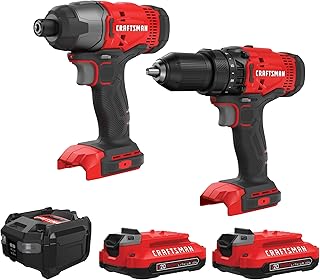 |
$99.00 | ⭐4.8 | Drill + impact driver combo, 2 batteries, LED work light, bag | Buy Now |
| PULITUO 20V Cordless Drill Driver |  |
$35.99 | ⭐4.5 | 30Nm torque, 21+1 clutch, 2 batteries, LED light, budget pick | Buy Now |
For a brushless upgrade, consider the DEWALT 20V MAX DCD777D1 (around $89.10, also rated 4.7) – it’s lighter and more efficient than brushed models. If you want an all-in-one kit for heavy use, the DEWALT DCK277D2 brushless combo (drill + impact driver, $152.10, 4.8 stars) is hard to beat.
Simple Maintenance to Prevent Future Problems
A few minutes of care can save you hours of troubleshooting later.
- Clean after every job: Wipe down the exterior and blow out the chuck and vents with compressed air.
- Store in a dry place: Humidity corrodes contacts and batteries. Use the included bag or a toolbox.
- Lubricate the chuck: Occasionally apply a drop of light machine oil to the chuck jaws and work it open/closed.
- Rotate batteries: If you have two batteries, swap them regularly to keep both in good condition.
- Tighten loose screws: Vibration can loosen housing screws. Check and tighten them periodically.
For a complete maintenance routine, read Drill Driver Safety Tips for Wood, Metal, Masonry, and Tight Spaces – it covers both safety and longevity.
Final Thoughts
A drill driver that stops working doesn’t always mean it’s dead. Many common problems – dead battery, dirty chuck, jammed trigger – can be fixed in minutes with basic tools and a little know‑how. Follow the steps above, and you’ll likely have your driver back in action without spending a dime.
If repairs aren’t cost‑effective, upgrading to a reliable model like the DEWALT 20V Max DCD771C2 or the CRAFTSMAN V20 MAX CMCK200C2 ensures you have a tool that’s built to last. With proper care, your next drill driver should deliver years of trouble‑free service.